Someone else might be signed in to your Claude account
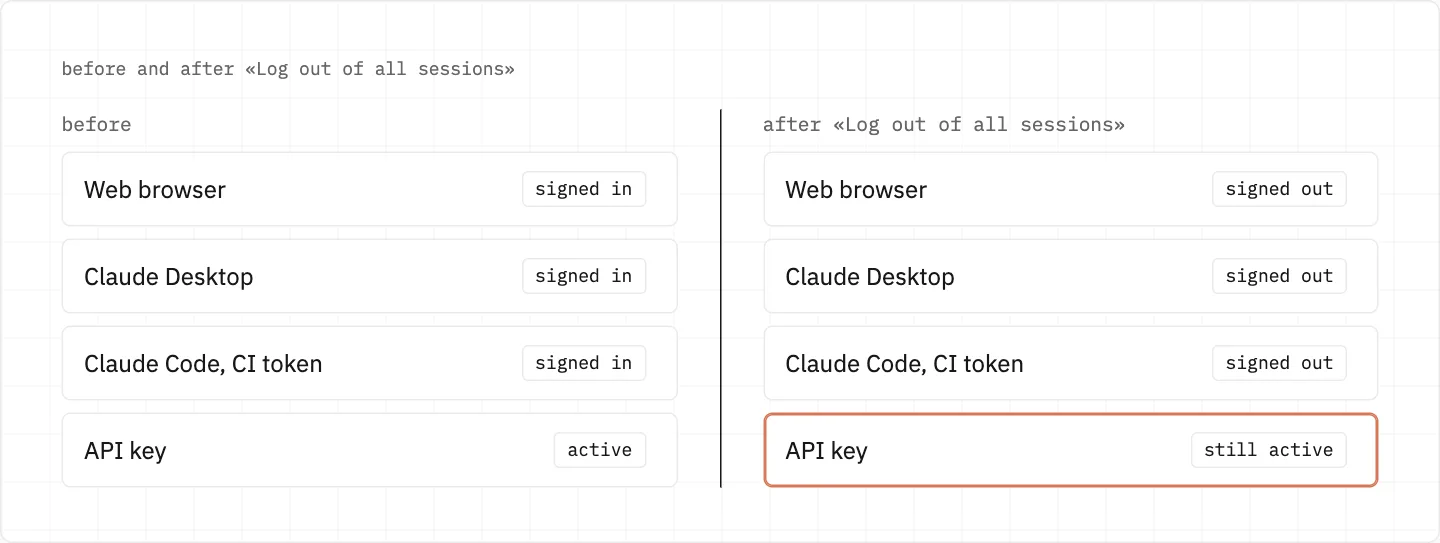
Claude has one switch for this: Log out of all sessions. It also signs out Claude Code — but not your API keys, which you revoke separately.
Web sessionssigned out
Claude Code, including CI setup tokenssigned out
API keysstill active
Where: Settings → Account on the web — not in the appsweb only
Do this now
On the web, go to Settings → Account and log out of all sessions.
It’s the recommended move when you suspect unauthorized access.
The option isn’t in the iOS or Android apps.
API keys are a separate lock
Logging out everywhere doesn’t touch API keys.
Suspect a key? Revoke it immediately.
Anyone using your key incurs charges on your behalf, so a key you are unsure about is cheaper revoked than watched.
The Console API keys page has a Delete API key option in each key’s menu.
never paste a key
Don’t put an API key in emails or support tickets — not even to Anthropic.
Every session and Claude Code sign out — the API key does not. Revoke it separately.
Only the Claude app on your phone
The iOS and Android apps don’t have the log-out-everywhere option.
Open Claude’s web version in the phone’s browser and use Settings → Account there.
Waiting for a computer is the slower choice: until you log out, any session someone else opened stays in place.
What changes after you log out every Claude session
Every device has to sign in again, including yours, through your email link or Google.
Claude Code is signed out as well, including tokens made with setup-token for CI, so CI jobs that relied on one are signed out too.
Without this step a claude.ai web session runs for 28 days, which is how long a forgotten browser could stay in.
No Claude password to change — protect the inbox instead
A Claude account has no password; access comes from the login link in your email or from your Google account.
So whoever can read that inbox, or use that Google account, can sign in as you.
Signed in with Google and no longer want that route? Remove «Claude by Anthropic» at myaccount.google.com/connections.
Anthropic’s help pages describe no second sign-in factor for a personal Claude account and no dedicated takeover procedure, so be wary of anyone telling you to «turn on 2FA» for Claude.
You can’t sign in to do it
Contact Support with the message icon on any Help Center page.
Keep it to one conversation, and expect replies in the messenger and at the account email.
Using the Console too? It is a separate account, so check its Logs and Usage pages for activity you don’t recognise.
stay safe
Anthropic’s marketing emails come only from addresses ending in anthropic.com or claude.com, and those inboxes are outbound only. Nobody can «recover» a Claude account for a fee: only Anthropic Support, and only for the owner.
We use cookies to collect data to improve your experience on our website. Read our usage policy cookies You can
your preferences at any time.
Website data collection settings
We use data collected through cookies and JavaScript libraries to improve your browsing experience, analyze website traffic, deliver personalized advertising, and improve the overall performance of our website.
Substantial
We use browser cookies that are necessary for the website to function properly. For example, we store your website data collection settings so that we can comply with them if you return to our website. You can disable these cookies in your browser settings, but if you do so, the website may not function as intended.
Marketing and analytics
To understand user behavior in order to provide you with a more relevant browsing experience or to personalize content on our website. For example, we collect information about which pages you visit to help us provide more relevant information.
Advertisement
To personalize and measure the effectiveness of advertising on our website and other websites. For example, we may show you personalized ads based on the pages you visit on our website.
Do you still have questions?
Let me hear them! 😊
Need help?
If you have questions or need assistance, our support team is ready to help you.