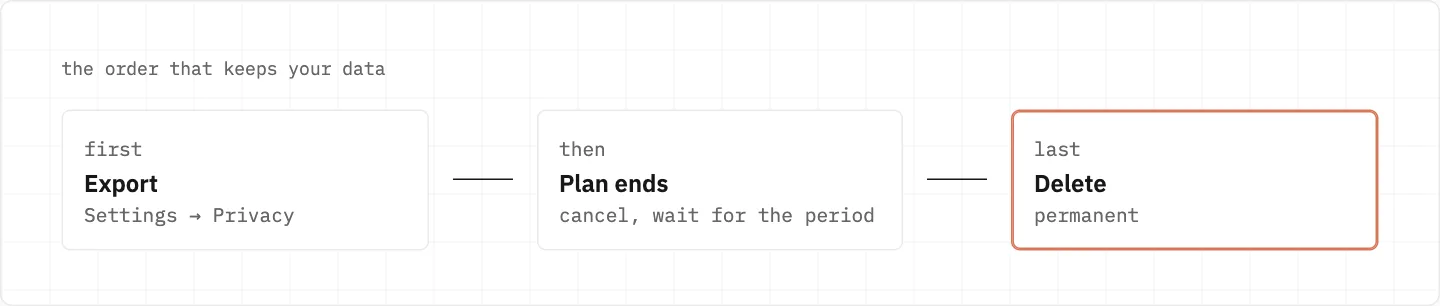
Export your Claude data first — deletion can’t be undone
A deleted Claude account can’t be recovered, so the order matters: export, cancel any paid plan, then delete.
24 hours
The export download link expires
end of period
Let a paid plan run out, then delete
30 days
Deleted chats leave back-end storage
up to 2 years
Flagged inputs and outputs kept
In order, not to scale.
Export
Settings → Privacy on the web or in Claude Desktop.
Not possible from the iOS or Android apps.
The link expires 24 hours after delivery, and you must be signed in to use it.
An export can’t be imported into another personal account.
Delete
Deletion is permanent and can’t be recovered.
On a paid plan: cancel and wait for the period to end.
Web: Settings → Account → Delete account.
Several accounts on one email? Say which to delete.
Using Claude through Poe or Slack? Delete through that service.
Seeing «Contact support» instead of the button means Support has to do it.
Export, let the paid period end, then delete — deletion can’t be recovered.
What is kept afterwards
Deleted conversations leave back-end storage within 30 days.
Chats flagged for safety: inputs and outputs up to 2 years, classification scores up to 7 years.
These periods are what the privacy pages give for conversations; they don’t state how long other account data is kept after the account itself is deleted.
No Delete account button, or no way to sign in
Seeing «Contact support» where the Delete account button should be? Support has to handle the deletion for you.
Locked out entirely? Open the message icon on any Help Center page and choose «I can’t login».
Even without access, Support can still help with deletion, exports and the subscription.
On a Free account, deletion support is offered where self-serve isn’t available.
More than one account on the same email? Say exactly which ones to delete.
Exporting or deleting a banned Claude account
A banned Free, Pro, Max or Ultra account can still sign in at claude.ai to export or delete — no need to contact Anthropic.
The data you can export may be restricted, depending on the Usage Policy violation.
If you want to contest the ban, the appeal form also needs you signed in, so appeal before you delete.
Claude through work: Team, Enterprise or the Console
On a Team or Enterprise plan, members can export their own data only once an owner turns on «Allow members to export their own data».
A Console account is a separate account from your Claude account, even when both use the same email.
Coming back to Claude after deleting
Signing up again can be blocked with a message about an account active within the last 30 days.
An exported archive can’t be imported into another personal Claude account.
An email whose account was banned for a Usage Policy violation can’t open a new account at all, whatever the wait.
stay safe
Anthropic’s marketing emails come only from addresses ending in anthropic.com or claude.com, and those inboxes are outbound only. Nobody can «recover» a Claude account for a fee: only Anthropic Support, and only for the owner.
We use cookies to collect data to improve your experience on our website. Read our usage policy cookies You can
your preferences at any time.
Website data collection settings
We use data collected through cookies and JavaScript libraries to improve your browsing experience, analyze website traffic, deliver personalized advertising, and improve the overall performance of our website.
Substantial
We use browser cookies that are necessary for the website to function properly. For example, we store your website data collection settings so that we can comply with them if you return to our website. You can disable these cookies in your browser settings, but if you do so, the website may not function as intended.
Marketing and analytics
To understand user behavior in order to provide you with a more relevant browsing experience or to personalize content on our website. For example, we collect information about which pages you visit to help us provide more relevant information.
Advertisement
To personalize and measure the effectiveness of advertising on our website and other websites. For example, we may show you personalized ads based on the pages you visit on our website.
Do you still have questions?
Let me hear them! 😊
Need help?
If you have questions or need assistance, our support team is ready to help you.