Where you paid decides who cancels and who refunds: Anthropic for the web, Apple for the App Store, Google Play’s rules for Android.
Bought on
Cancel in
Refund from
Web or Desktop
Settings → Billing → Cancel
Anthropic Support
iPhone or iPad
Your device (App Store)
Apple only
Android
Google Play
Support, with the Play email or order number
Cancel
On the web or Desktop: Settings → Billing → Cancel.
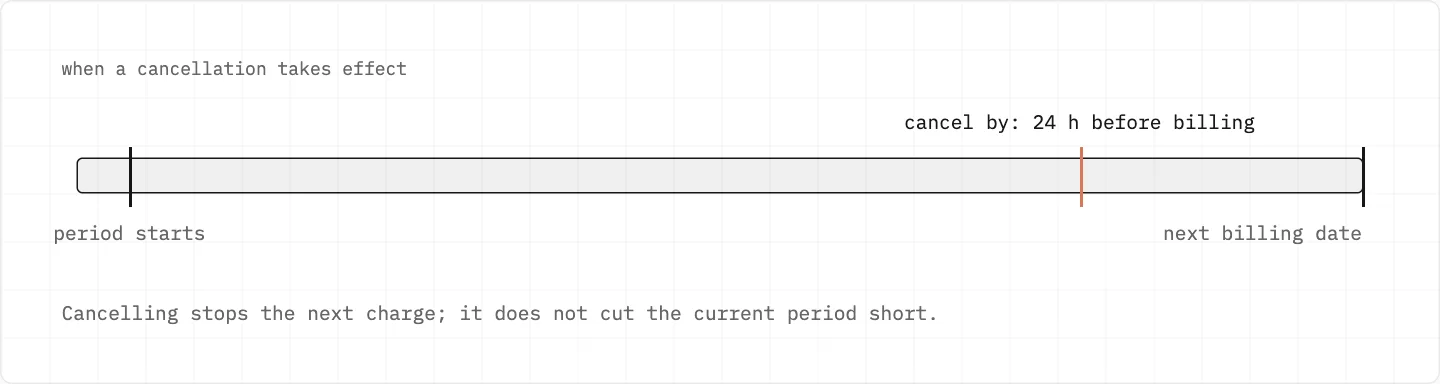
Cancel at least 24 hours before the next billing date.
The plan stays until the end of the period you paid for.
Bought on iOS: it’s handled on your iOS device.
App already deleted? The App Store or Google Play instructions still work.
Cancel at least 24 hours before the next billing date; the plan keeps working until the period ends.
Refunds
Payments are non-refundable except under the Consumer Terms or the law.
Request: Get help → send a message → «Claude Refund Request».
EEA and UK: a refund within 14 days of purchase.
No refund while a bank dispute is open.
Sending the Claude Refund Request from the web
Signed in, click your initials or name in the lower left and choose «Get help» to open the messenger.
Send a message, click «Accept», then pick «Claude Refund Request» from the options.
In the EEA or the UK, a request within 14 days of purchase can be refunded on a prorated basis.
Keep the request in one conversation; a duplicate doesn’t move it faster.
Replies arrive in the messenger and at the email on your Claude account.
Open a bank dispute only if you have decided against the refund request: while it is pending, Support can’t refund anything.
Charged through the App Store for Claude
Only Apple can review and refund App Store charges; Anthropic Support can’t see or refund them.
Asking Apple for a refund doesn’t cancel the subscription, so cancel it on your iOS device as well.
Removed the app already? Apple’s App Store instructions still let you unsubscribe.
Subscribed to Claude through Google Play
Cancel through Google Play; the Google Play instructions work even after the app is gone.
For an Android subscription that is no longer active, give Support your Google Play email or the GPA order number.
Cancelling before you delete the Claude account
On a paid plan, cancel and wait until the end of the current subscription period before deleting.
Deletion is permanent: conversations, projects and saved data go with it.
Paid, but the account shows Free
You may be signed in with a different email.
Or the payment failed and the account was downgraded.
Locked out of the paid account: write from another email and copy in the account one.
Check which address you paid with and sign in with that one; Continue with Google and Continue with email are two separate ways in.
stay safe
Anthropic’s marketing emails come only from addresses ending in anthropic.com or claude.com, and those inboxes are outbound only. Nobody can «recover» a Claude account for a fee: only Anthropic Support, and only for the owner.
We use cookies to collect data to improve your experience on our website. Read our usage policy cookies You can
your preferences at any time.
Website data collection settings
We use data collected through cookies and JavaScript libraries to improve your browsing experience, analyze website traffic, deliver personalized advertising, and improve the overall performance of our website.
Substantial
We use browser cookies that are necessary for the website to function properly. For example, we store your website data collection settings so that we can comply with them if you return to our website. You can disable these cookies in your browser settings, but if you do so, the website may not function as intended.
Marketing and analytics
To understand user behavior in order to provide you with a more relevant browsing experience or to personalize content on our website. For example, we collect information about which pages you visit to help us provide more relevant information.
Advertisement
To personalize and measure the effectiveness of advertising on our website and other websites. For example, we may show you personalized ads based on the pages you visit on our website.
Do you still have questions?
Let me hear them! 😊
Need help?
If you have questions or need assistance, our support team is ready to help you.