«Wrong authentication method» on ChatGPT: the key, not the account
This error means you tried a sign-in method that isn’t enabled for your account. The account is still there; it just knows a different way in.
You signed up with
Press
A password is reset at
Email and password
Email, then password
ChatGPT: Forgot password?
Google
Continue with Google, same Google account
Google
Microsoft
Continue with Microsoft, same account
Microsoft
Apple
Continue with Apple, same Apple account
Apple
What the error is telling you
«Wrong authentication method» or «already a user with email» appears when the method you used isn’t enabled for the account.
Unsure which method you first used? Try a password, Google, Microsoft and Apple in turn.
With Google, Microsoft or Apple, use the matching button and the same provider account.
Apple’s relay address
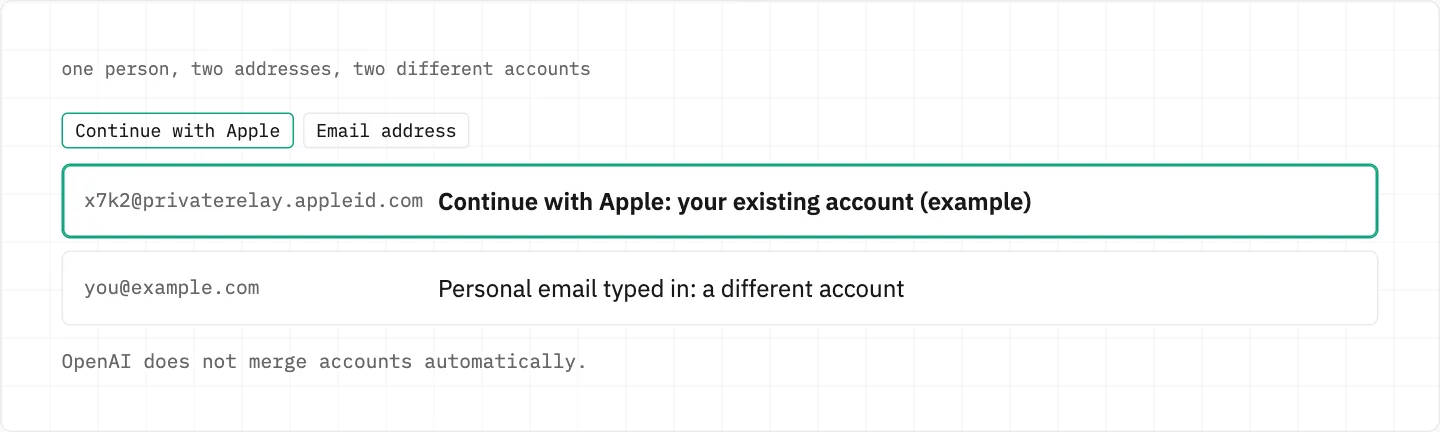
Signed up with Hide My Email? The account may sit on an @privaterelay.appleid.com address.
Entering your personal email, or another social login, opens a different account.
OpenAI doesn’t merge accounts automatically.
A Hide My Email account lives on the @privaterelay.appleid.com address. Typing your personal email opens a different account, and the two are not merged automatically.
Adding a second way in
An email-and-password account can later use Google, Microsoft or Apple if the email matches; both methods then combine.
A social sign-up can add a password: Settings → Security and login → Password, and select Add.
With MFA turned on, you keep your current login method until MFA is disabled.
Planning to move the account to another email later? A social sign-up needs that OpenAI password first.
When the Google, Microsoft or Apple account won’t open
OpenAI holds no password for these sign-ups, so nothing can be reset on the ChatGPT side.
Their passwords are reset directly on the provider’s own website.
Think someone got in through Google or Microsoft? Reset that provider password — that is where the key lives.
How Google, Microsoft and Apple restore their own accounts is their process; this guide does not describe it.
Trying each button without locking yourself out
A «suspicious login behavior» warning means stop: wait up to an hour, since repeated failed attempts can bring temporary restrictions.
Type the account email — it may not be the address that receives your invoices or receipts.
Deleting the account does not change the authentication method.
A deleted account cannot be reactivated.
Deletion is permanent, and a new account on the same email — possible after 30 days — starts without your chats, files or saved memories.
No button opens your ChatGPT account
Open Support from the chat bubble at the bottom-right of help.openai.com; a bot answers first.
If the inbox behind the account is gone too, self-serve won’t help, and SMS is no alternative for email-based login.
Tell Support the account email, the sign-in method you tried and any billing or subscription details.
one owner, one account
If a stranger offers to «move» or «unlock» your ChatGPT account, walk away: no one recovers an account for money, and messages claiming to be OpenAI should come from an official OpenAI domain.
We use cookies to collect data to improve your experience on our website. Read our usage policy cookies You can
your preferences at any time.
Website data collection settings
We use data collected through cookies and JavaScript libraries to improve your browsing experience, analyze website traffic, deliver personalized advertising, and improve the overall performance of our website.
Substantial
We use browser cookies that are necessary for the website to function properly. For example, we store your website data collection settings so that we can comply with them if you return to our website. You can disable these cookies in your browser settings, but if you do so, the website may not function as intended.
Marketing and analytics
To understand user behavior in order to provide you with a more relevant browsing experience or to personalize content on our website. For example, we collect information about which pages you visit to help us provide more relevant information.
Advertisement
To personalize and measure the effectiveness of advertising on our website and other websites. For example, we may show you personalized ads based on the pages you visit on our website.
Do you still have questions?
Let me hear them! 😊
Need help?
If you have questions or need assistance, our support team is ready to help you.