Forgot your ChatGPT password: the reset that fits your account
A ChatGPT reset starts on the password screen and finishes in your email — unless you signed up with only a phone number, or used Google, Microsoft or Apple and never had an OpenAI password.
Your situation
Where to reset
What you get
Signed out, email account
Password screen → Forgot password?
A reset email
Still signed in
Settings → Account
Change it in place
Phone-only account
SMS, on a device used before
A text message
Google, Microsoft or Apple sign-up
The provider’s own website
No OpenAI password exists
Signed out: the Forgot password? route
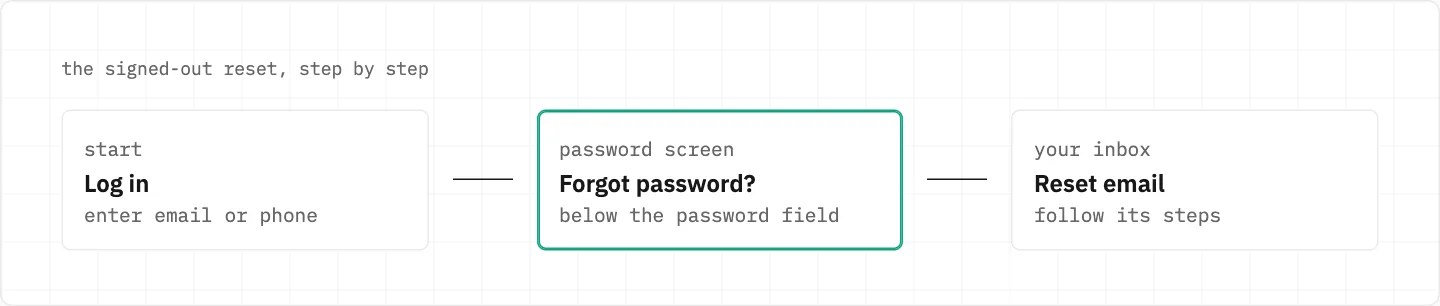
Log in, enter your email or phone, then select Forgot password? on the password screen.
Follow the steps in the reset email you receive.
One password covers the whole OpenAI account, the API Platform included.
Unsure the account has a password at all? Try Google, Microsoft and Apple in turn.
Log in, enter your email or phone, choose Forgot password? on the password screen, then follow the reset email.
The reset email is nowhere
Check spam, make sure you are looking in the inbox you signed up with, and look for typos in the address.
The account email may differ from the address that receives invoices or receipts.
Signed up with Google, Microsoft or Apple? There is no password to reset — do it on the provider’s website.
Lost the inbox itself? Self-serve won’t help, and SMS can’t replace email-based login.
In that case Support needs the account email, the sign-in method you tried and any billing or subscription details.
Codes and warnings on the way back in
Requested several codes? Use the most recent one; check spam or quarantine and allowlist [email protected].
A «suspicious login behavior» warning means waiting up to an hour before trying again — repeated failed attempts can bring temporary restrictions.
Still signed in on some device
Add or change the password under Settings → Account.
The new password applies to your entire OpenAI account.
Once the new ChatGPT password works
If someone else may know the old password, the change logs out all current sessions within 30 minutes.
MFA adds a second check on top of the password, across ChatGPT and the API Platform alike.
Choose an authenticator app, a push approval, an SMS or WhatsApp code, or a passkey.
With MFA on, you must keep your current login method until MFA is disabled.
Signed up with only a phone number
The password can be reset by SMS.
The reset needs a device you have already used at least once to log in.
MFA becomes available only after you link an email.
To link one, open ChatGPT on the web and go to Settings > Account.
the code is yours alone
A reset link or SMS code is for you only — never pass it to anyone, Support included. OpenAI says it does not ask for verification codes by email, text or chat.
We use cookies to collect data to improve your experience on our website. Read our usage policy cookies You can
your preferences at any time.
Website data collection settings
We use data collected through cookies and JavaScript libraries to improve your browsing experience, analyze website traffic, deliver personalized advertising, and improve the overall performance of our website.
Substantial
We use browser cookies that are necessary for the website to function properly. For example, we store your website data collection settings so that we can comply with them if you return to our website. You can disable these cookies in your browser settings, but if you do so, the website may not function as intended.
Marketing and analytics
To understand user behavior in order to provide you with a more relevant browsing experience or to personalize content on our website. For example, we collect information about which pages you visit to help us provide more relevant information.
Advertisement
To personalize and measure the effectiveness of advertising on our website and other websites. For example, we may show you personalized ads based on the pages you visit on our website.
Do you still have questions?
Let me hear them! 😊
Need help?
If you have questions or need assistance, our support team is ready to help you.