Lost your ChatGPT second factor: what still opens the account
MFA on ChatGPT guards the whole OpenAI account, API Platform included. Lose every method and the standard way back is a Support verification — but with Advanced Account Security, only your recovery key helps.
Question
Standard MFA
Advanced Account Security
Methods
Authenticator app, push, SMS or WhatsApp code, passkey
At least two passkeys or security keys, one cross-device
Email
Not an MFA method
Email recovery switched off
Every method lost
Support verification, then a one-time email login
A recovery key; unlock 48 hours after entering it
Support restores access
After verification
No
Which second factor you had
MFA can be an authenticator app, a push approval, a 6-digit code by SMS or WhatsApp, or a passkey.
It is managed under Settings → Security and login → Multi-factor authentication (MFA).
Once on, it applies across ChatGPT and the API Platform.
Email is not available as a standard MFA method.
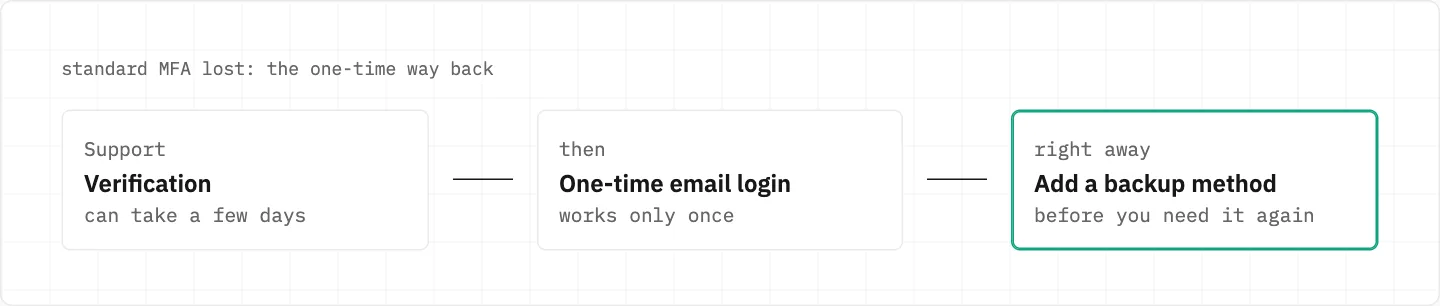
Every method lost: the one-time way back
Contact Support and complete a verification process, which can take a few days.
Support then provides a one-time email recovery login.
That option is available only once — add a backup MFA method as soon as you are in.
Support opens from the chat bubble at the bottom-right of help.openai.com, where a bot answers first.
Support verifies you, then gives a one-time email recovery login. It works once — add a backup method straight after.
Codes that still reach a surviving method
Several codes sent? Only the most recent one counts; check spam or quarantine and allowlist [email protected].
A push request for a login you did not start: answer «No, deny access» to block it.
A spare second factor before the next loss
Standard MFA accepts several kinds of method — an authenticator app, push, an SMS or WhatsApp code, a passkey — so a spare of another kind is possible.
A phone-only account cannot turn MFA on until it links an email in Settings > Account on the web.
If you switched on Advanced Account Security
Password sign-in, email and SMS codes and email account recovery are switched off.
It needs at least two secure sign-in methods, one of which works across devices.
Each recovery key works once; the account unlocks 48 hours after you enter a valid one.
OpenAI Support cannot reset your password, remove it, or add sign-in methods for you.
Lose all sign-in methods and recovery keys and you may lose the account.
It is not offered to ChatGPT Enterprise users or enterprise-managed accounts.
MFA and the way you log in
While MFA is on, you must keep using your current login method.
Turning MFA on doesn’t sign out other devices or sessions.
a code is not a favour
Anyone asking for your authenticator code or a recovery key is not helping you: OpenAI Support itself says not to share passwords or one-time codes, and OpenAI does not ask for them by email, text or chat.
We use cookies to collect data to improve your experience on our website. Read our usage policy cookies You can
your preferences at any time.
Website data collection settings
We use data collected through cookies and JavaScript libraries to improve your browsing experience, analyze website traffic, deliver personalized advertising, and improve the overall performance of our website.
Substantial
We use browser cookies that are necessary for the website to function properly. For example, we store your website data collection settings so that we can comply with them if you return to our website. You can disable these cookies in your browser settings, but if you do so, the website may not function as intended.
Marketing and analytics
To understand user behavior in order to provide you with a more relevant browsing experience or to personalize content on our website. For example, we collect information about which pages you visit to help us provide more relevant information.
Advertisement
To personalize and measure the effectiveness of advertising on our website and other websites. For example, we may show you personalized ads based on the pages you visit on our website.
Do you still have questions?
Let me hear them! 😊
Need help?
If you have questions or need assistance, our support team is ready to help you.