Cancel a ChatGPT plan where you bought it, then sort out the money
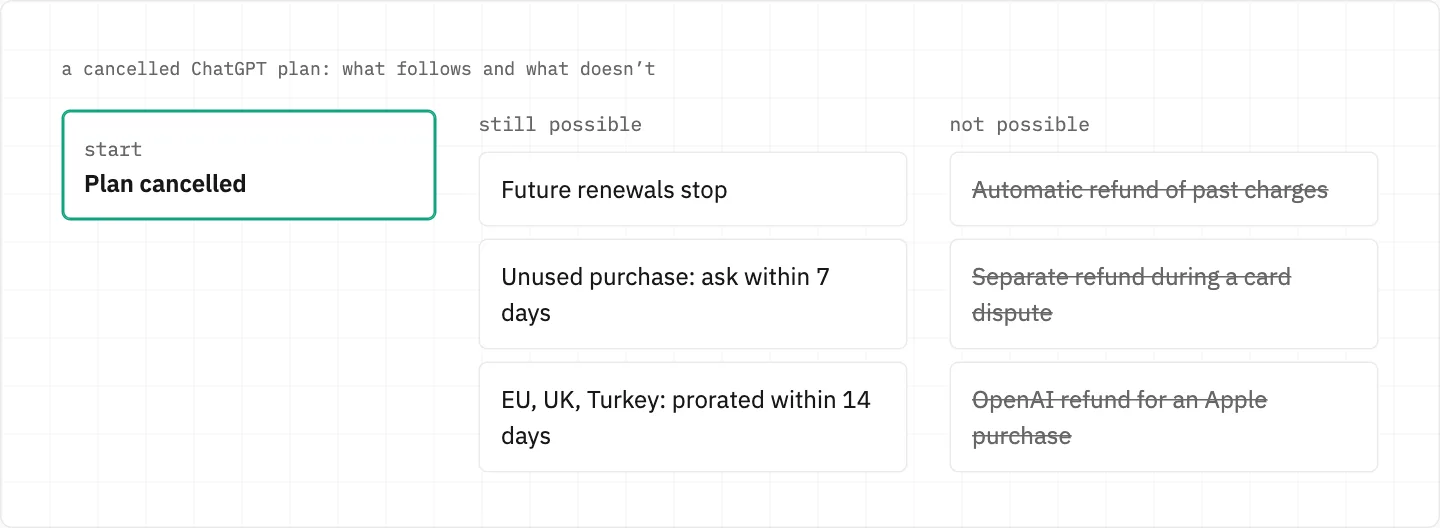
A ChatGPT plan is cancelled on the platform that bills it — chatgpt.com, Apple or Google Play — and cancelling stops future renewals; it doesn’t refund what you already paid.
within 7 days
Unused individual purchase: a discretionary refund may be available
within 14 days
EU, UK, Turkey: prorated refund if you cancel
24 h before billing
Latest moment to cancel the next renewal
In order, not to scale.
Find who bills you
Bought on chatgpt.com
Settings → Billing, then Cancel under Cancel plan.
Bought in the iPhone app
Cancel with Apple; refunds for Apple purchases come only from Apple.
Bought on Google Play
Cancel through Google Play.
Can’t reach that store account
Recover it with Apple or Google first.
Can’t sign in to ChatGPT
Support can cancel with the account email plus any two billing details — never send the complete card number.
Getting money back
Payments are generally non-refundable; billing errors, unauthorized charges and service failures are the exceptions.
An unused individual purchase may get a discretionary refund if you ask within seven days of the charge.
Ask in the Help Center chat while logged in to help.openai.com with the account that was charged.
EU, UK and Turkey: a prorated refund if you cancel within 14 days of purchase.
No separate refund while a payment dispute with your card is active.
The chat opens from the bubble at the bottom-right of help.openai.com; a bot answers first.
Cancelling stops renewals; refunds are a separate request with their own windows, and Apple purchases go back to Apple.
Timing the cancellation against the renewal
Cancel at least 24 hours before the next billing date.
Cancelling stops future renewals but does not refund earlier charges — a refund is a separate request.
Check both dates: the 24-hour cut-off governs the renewal, while the seven- and fourteen-day windows govern refunds.
A charge you don’t recognise
Contact your bank immediately if you think the charge is unauthorized.
Unauthorized charges must be validated before a refund is issued.
Check every inbox: the account email may differ from the receipt email.
Someone else got into the account? Report it with «Report unauthorized activity involving my account» on the Unauthorized Activity webform.
Then change the password: all current sessions are logged out within 30 minutes.
Cancelling as part of leaving ChatGPT
Export your chats from Settings → Data controls before closing the account.
Account deletion is permanent and also ends API access.
A banned account’s eligible plans billed directly by OpenAI stop renewing; store plans are handled on their own platform.
Things that don’t stop the billing
Uninstalling the app doesn’t cancel the plan.
Deleting the account doesn’t cancel an Apple subscription.
card details stay with you
Nobody needs your full card number, your password or a one-time code to cancel or refund ChatGPT — OpenAI asks for none of them by email, text or chat. A «refund agent» who does is a scam.
We use cookies to collect data to improve your experience on our website. Read our usage policy cookies You can
your preferences at any time.
Website data collection settings
We use data collected through cookies and JavaScript libraries to improve your browsing experience, analyze website traffic, deliver personalized advertising, and improve the overall performance of our website.
Substantial
We use browser cookies that are necessary for the website to function properly. For example, we store your website data collection settings so that we can comply with them if you return to our website. You can disable these cookies in your browser settings, but if you do so, the website may not function as intended.
Marketing and analytics
To understand user behavior in order to provide you with a more relevant browsing experience or to personalize content on our website. For example, we collect information about which pages you visit to help us provide more relevant information.
Advertisement
To personalize and measure the effectiveness of advertising on our website and other websites. For example, we may show you personalized ads based on the pages you visit on our website.
Do you still have questions?
Let me hear them! 😊
Need help?
If you have questions or need assistance, our support team is ready to help you.