Your xAI API key leaked: shut it off, replace it, cap the spend
xAI asks you to treat API keys like passwords or credit card details. If one may be compromised, log in to the xAI console, check you are on the right team, disable or delete the key and create a new one.
xAI consoleLog in, check the team
API KeysDisable key
or Delete key — permanent
API KeysCreate API Key
your appsSwap in the new key
Turn the key off
Log in to the xAI console first and make sure you are on the right team.
In the API Keys table, choose Disable key to deactivate it temporarily, or Delete key to remove it permanently.
Then click Create API Key and update your applications with the new one.
When xAI spots the leak first
Leaked keys found by GitHub Secret Scanning are disabled by xAI, and you are notified by email.
Team admins can view an audit log of user interactions.
By default, API requests and responses are stored encrypted for 30 days for auditing in case of suspected abuse.
How far a leaked key can spend
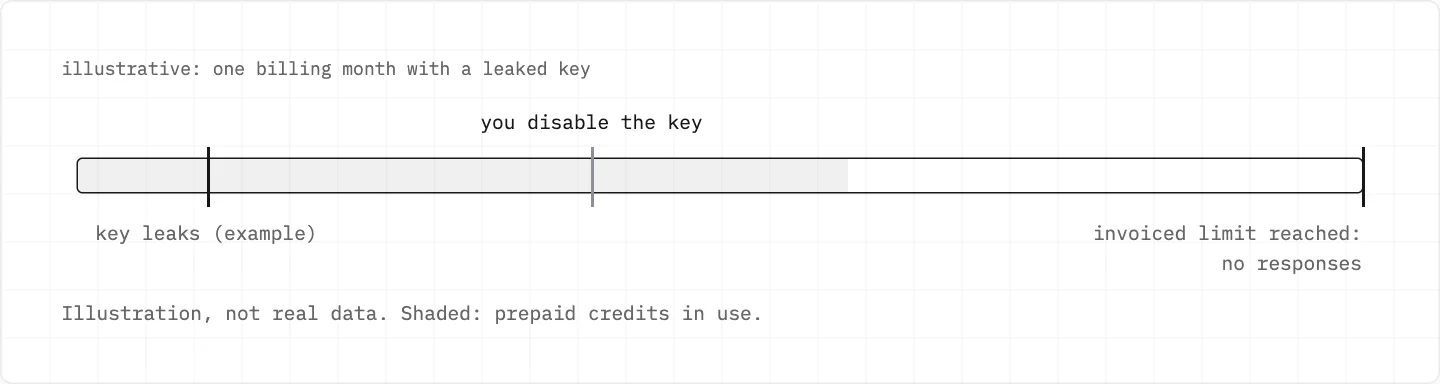
With the default invoiced billing limit of $0, xAI uses only your prepaid credits.
Once the month’s invoiced amount reaches the invoiced billing limit, requests get no response until you raise the limit.
Prepaid credits aren’t refunded unless the law in your region requires it.
With the default $0 invoiced limit only prepaid credits are spent, and requests stop at the invoiced limit. Illustration, not real data.
The key and your Grok account
One xAI account serves Grok and the API, but the two are billed separately.
Deleting that account removes your API access too.
One email can have several xAI accounts under different sign-in methods; you manage the sign-in methods of each at accounts.x.ai.
If the console login itself may be exposed
xAI emails you whenever someone logs in to your xAI account; the location in that email is only an IP-based approximation.
A login that wasn’t you: reset your password and clear your login sessions at accounts.x.ai.
Add a multi-factor authentication method, as xAI recommends for every user, and generate recovery codes on the accounts.x.ai Security page.
Keep those codes: xAI can’t remove or reset MFA unless you have them.
A third-party app reaching a «Studio» view with your Grok credentials: revoke and change those credentials.
Usage run up on a leaked key
xAI API credits are non-refundable.
Compromised usage generally can’t be refunded if the purchase location matches your usual location.
A large invoice you don’t recognise: check the purchase date and your subscription history before disputing.
For billing matters you can reply to your receipt email.
never share a key
An API key is as sensitive as a password or card number — don’t paste it into a chat, an email or a site that promises to «unlock» your account. Scam sites use xAI’s name and logo.
We use cookies to collect data to improve your experience on our website. Read our usage policy cookies You can
your preferences at any time.
Website data collection settings
We use data collected through cookies and JavaScript libraries to improve your browsing experience, analyze website traffic, deliver personalized advertising, and improve the overall performance of our website.
Substantial
We use browser cookies that are necessary for the website to function properly. For example, we store your website data collection settings so that we can comply with them if you return to our website. You can disable these cookies in your browser settings, but if you do so, the website may not function as intended.
Marketing and analytics
To understand user behavior in order to provide you with a more relevant browsing experience or to personalize content on our website. For example, we collect information about which pages you visit to help us provide more relevant information.
Advertisement
To personalize and measure the effectiveness of advertising on our website and other websites. For example, we may show you personalized ads based on the pages you visit on our website.
Do you still have questions?
Let me hear them! 😊
Need help?
If you have questions or need assistance, our support team is ready to help you.