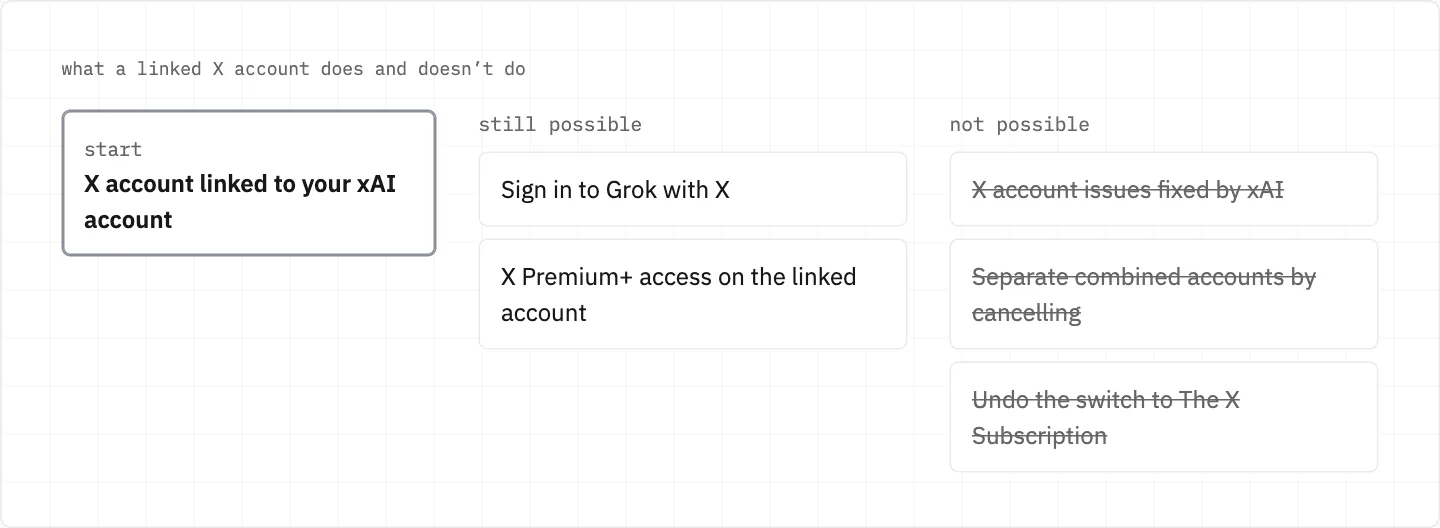
Your X account can open Grok, but it is not your Grok account
Linking X adds it as one more way to sign in to your xAI account and lets xAI read your X subscription status. The two accounts stay separate: X keeps its own session, and X account problems go to X.
grok.comSettings → Account
Connect your X Account
X sign-in pageX added as a sign-in method
to your xAI account
xAISubscription status read
matching benefits granted
Adding X as a sign-in method
On grok.com go to Settings → Account → Connect your X Account; it opens X’s sign-in page to add X as a sign-in method.
After linking, xAI can read your X subscription status and grant the relevant benefits.
Only personal X accounts can be connected.
X Premium+ access applies only to the xAI account linked with your X account.
When Sign in with X fails
Confirm you can access that account in X, then try again.
Signing out of Grok does not sign you out of X, which keeps its own session.
A subscription is tied to the account it was bought with, so a different login won’t show it.
If X itself won’t let you in, that is a question for X. This site states no steps for the X account.
The X Subscription and combined accounts
The X Subscription is one subscription that brings Grok, Cursor and X together.
Switching to it is permanent: it can’t be undone, and Support can’t undo it for you.
Combining accounts is permanent, and cancelling does not separate them.
Old subscriptions cancelled at the switch get an automatic prorated refund for unused time.
before you switch
Be sure which xAI account you want combined with X — neither the switch nor the combining can be reversed.
Linking X gives you a sign-in method and Premium+ benefits; it doesn’t make xAI responsible for X, and combining or switching can’t be reversed.
Signing in with X is not the same as linking
Signing in only authenticates you: it does not link or combine accounts, switch your plan or cancel a subscription.
One email can sit behind several xAI accounts, one per sign-in method, so signing in with X may open a different account from your email login.
Plan or history missing after you signed in with X? Sign out and use the sign-in method you used for that account before.
You manage sign-in methods at accounts.x.ai, and you can add more there after sign-up.
Paying for Grok through X or the bundle
If you subscribed to The X Subscription on X, you cancel it in X.
Moved over from a Google Play plan that is still set to renew? Cancel that one in Google Play.
The prorated refund for an old plan goes back to your original payment method; it isn’t added as credit to The X Subscription.
What xAI can’t fix on X
xAI cannot assist with X account issues.
xAI has no operational oversight of X; X issues go to the X Help Center or @premium.
X Premium refunds are processed by X, not xAI, where the law requires one.
stay safe
An offer to «unlock» your X or Grok account for a fee does not come from xAI: scam sites use xAI’s name and logo. X problems go to the X Help Center, Grok problems to xAI.
We use cookies to collect data to improve your experience on our website. Read our usage policy cookies You can
your preferences at any time.
Website data collection settings
We use data collected through cookies and JavaScript libraries to improve your browsing experience, analyze website traffic, deliver personalized advertising, and improve the overall performance of our website.
Substantial
We use browser cookies that are necessary for the website to function properly. For example, we store your website data collection settings so that we can comply with them if you return to our website. You can disable these cookies in your browser settings, but if you do so, the website may not function as intended.
Marketing and analytics
To understand user behavior in order to provide you with a more relevant browsing experience or to personalize content on our website. For example, we collect information about which pages you visit to help us provide more relevant information.
Advertisement
To personalize and measure the effectiveness of advertising on our website and other websites. For example, we may show you personalized ads based on the pages you visit on our website.
Do you still have questions?
Let me hear them! 😊
Need help?
If you have questions or need assistance, our support team is ready to help you.